Having worked across numerous Amazon Lex deployments, there's one pattern I see repeated more than any other: teams treat go-live day like a finishing line. The project is "done." The bot is live. Everyone celebrates.
But here's the reality — go-live is almost the beginning of the journey. It's the start of continuous improvement. The bot you launch on Day 1 is the worst version of that bot that will ever exist. Every day after that, it should be getting better. But only if you've prepared for it.
I've seen what happens when teams get this right, and when they don't. The difference is stark. Teams with a solid post-launch process typically see intent recognition climb from the mid-80s to above 93% within the first 8 weeks. Containment rates that start at 65-70% can reach 80%+ in the same timeframe. Missed utterances that numbered in the hundreds on Day 1 drop to single digits per week. These aren't theoretical numbers — they're the kind of improvements that come from having the right process in place from the start.
On the flip side, teams without this process? Their bots stagnate. Three months after launch they're still running the same model, with the same gaps, losing the same customers to agent escalation every single day. The cost of inaction compounds quickly.
When thinking about People, Process, Leadership and Technology — this blog focuses on the Process part. What needs to be in place on Day 1 so your team can optimise Lex quickly and confidently.
The Non-Negotiable: A Process to Optimise Quickly
The single non-negotiable for Day 1 is this: there must be a well-established process in place to optimise your Lex bots quickly. Not "we'll figure it out when we need to" — a documented, tested, repeatable process that your team can execute from the moment real traffic starts flowing.
Without this, you'll find yourself scrambling when the inevitable happens — missed utterances pile up, containment drops, and stakeholders start asking questions you can't answer fast enough.
Moving Production Data to Lower Environments
Here's the first challenge. Most customers — rightly — lock down their production environment. Developers can't just jump in and start tweaking the live bot. Changes need to be developed and tested in lower environments first.
But to optimise effectively, you need real production data. Real conversations. Real missed utterances. Real failure patterns. So you need a process that can move production data down to a lower environment where developers can work with it.
Critical consideration: PII. Production conversation logs will almost certainly contain personally identifiable information — names, account numbers, dates of birth. Your data pipeline must handle this. Anonymisation, masking, or tokenisation needs to be baked into the process before you go live. This blog won't prescribe the solution, but I cannot stress enough how important it is to get this right. Get it wrong and you're looking at regulatory consequences.
Tooling: Know Where to Improve
You can't optimise what you can't measure. Before Day 1, have your tooling ready to review bot performance and understand where improvements can be made.
Confusion Matrix
A confusion matrix is a good starting point. It shows you which intents are being correctly classified and — more importantly — which are being confused with each other. If your "MakePayment" intent is regularly being misclassified as "CheckBalance," you've got a training data problem you can fix.
Lex Analytics
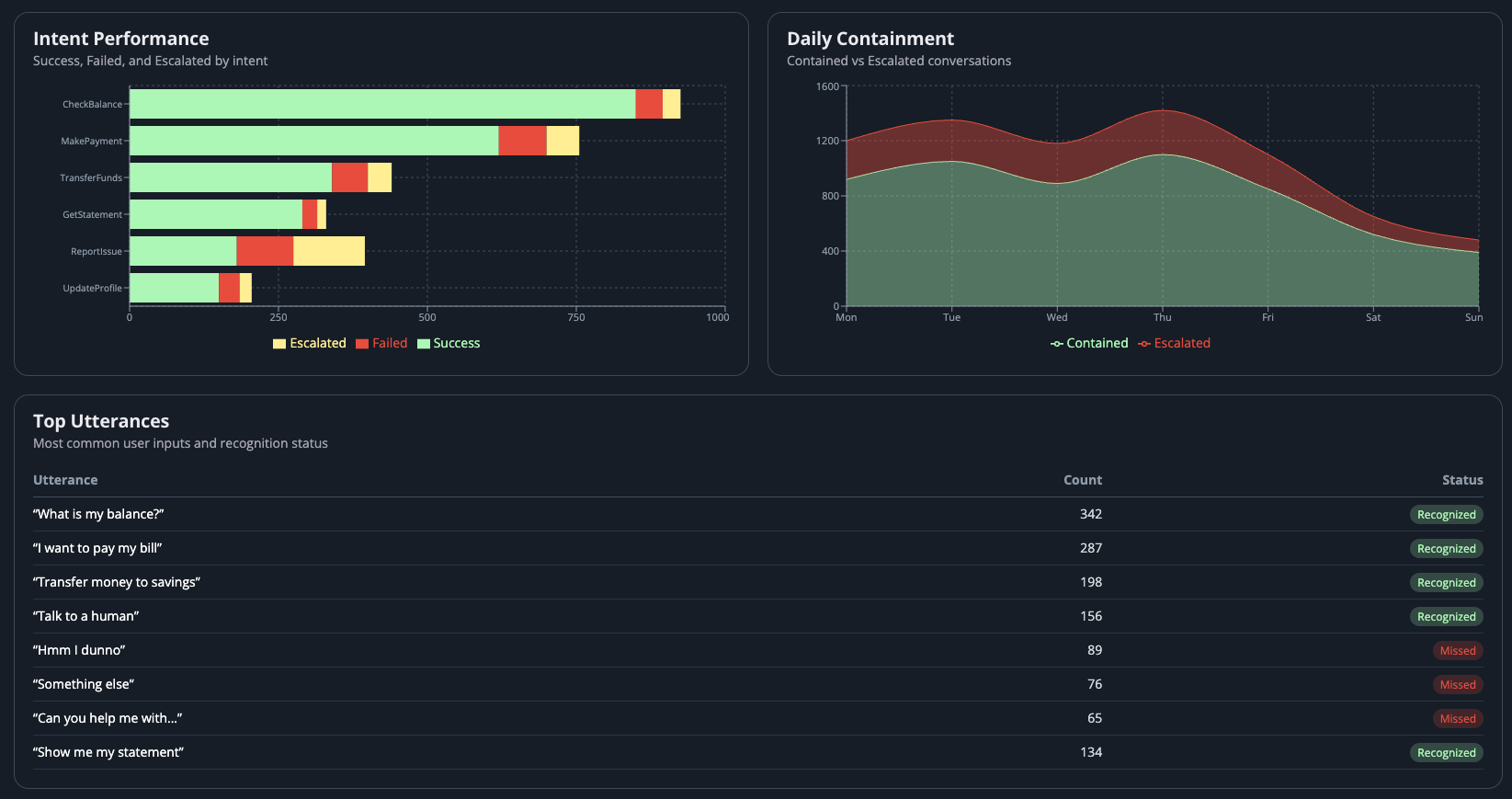
Utilise the built-in Lex analytics to identify:
- Missed utterances — what are customers saying that the bot doesn't understand?
- Incorrectly classified intents — where is the bot confidently wrong?
- Slot coverage — are your slots capturing the values they need to, or are customers expressing things in ways you didn't anticipate?
Example dashboard: Intent performance, daily containment, and utterance recognition at a glance.
Test, Test, Test
Once you've made changes to the model based on your analytics, don't just push them through. Use the Lex Test Workbench to load test your updated bot before promoting changes.
Think about different types of testing:
- Happy path — does the expected flow still work?
- Edge cases — what about the weird inputs you've seen in production?
- Regression — have your changes broken something that was working before?
- Volume — how does the bot perform under load?
Run the test workbench against different types of test data. Don't just test with the same clean, well-formed utterances you trained with. Use the messy, real-world inputs from your production logs.
Review Latencies
While testing, pay attention to bot latency. High response times kill the customer experience in voice channels. Look specifically at:
- Overall bot response time
- Code hook Lambda execution time
- Fulfilment Lambda execution time
- Any external API calls adding delay
If your Lambda is taking 3 seconds to respond, that's 3 seconds of silence for the caller. Unacceptable in a voice IVR.
Use AI to Accelerate Optimisation
Here's where it gets interesting. You can use AI to consume all your internal Lex best practice documentation and the community's public blogs, then feed it the feedback from your Lex analytics — the missed utterances, the confusion matrix output, the slot fill rates.
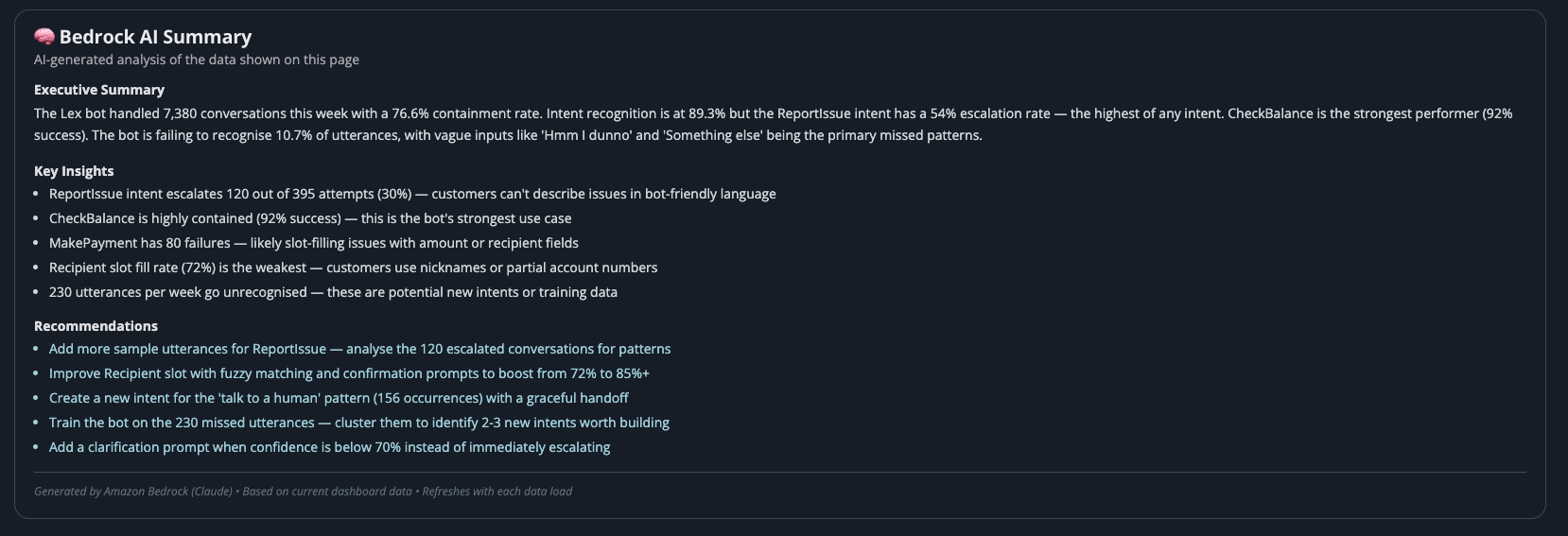
Let AI guide you through the most obvious changes. It can identify patterns in missed utterances, suggest new training phrases, recommend slot type adjustments, and flag intents that need restructuring. Then run the test workbench again to validate.
In practice, this collapses what used to be days of manual analysis into minutes. An AI assistant can look at 500 missed utterances, cluster them by pattern, and tell you "these 120 are all variations of customers trying to report an issue — your ReportIssue intent needs these 15 new sample utterances." That's actionable insight delivered in seconds rather than a human spending half a day in a spreadsheet.
AI-generated analysis of bot performance — identifying issues and recommending specific improvements.
This creates a tight feedback loop: Analyse → Identify → Fix → Test → Deploy → Repeat. Teams running this loop weekly see measurable improvement in every cycle. Those running it monthly fall behind.
Monitoring and Alerting
Finally, build dashboards. You need real-time visibility into how your bot is performing — not a weekly report that arrives three days after a problem started.
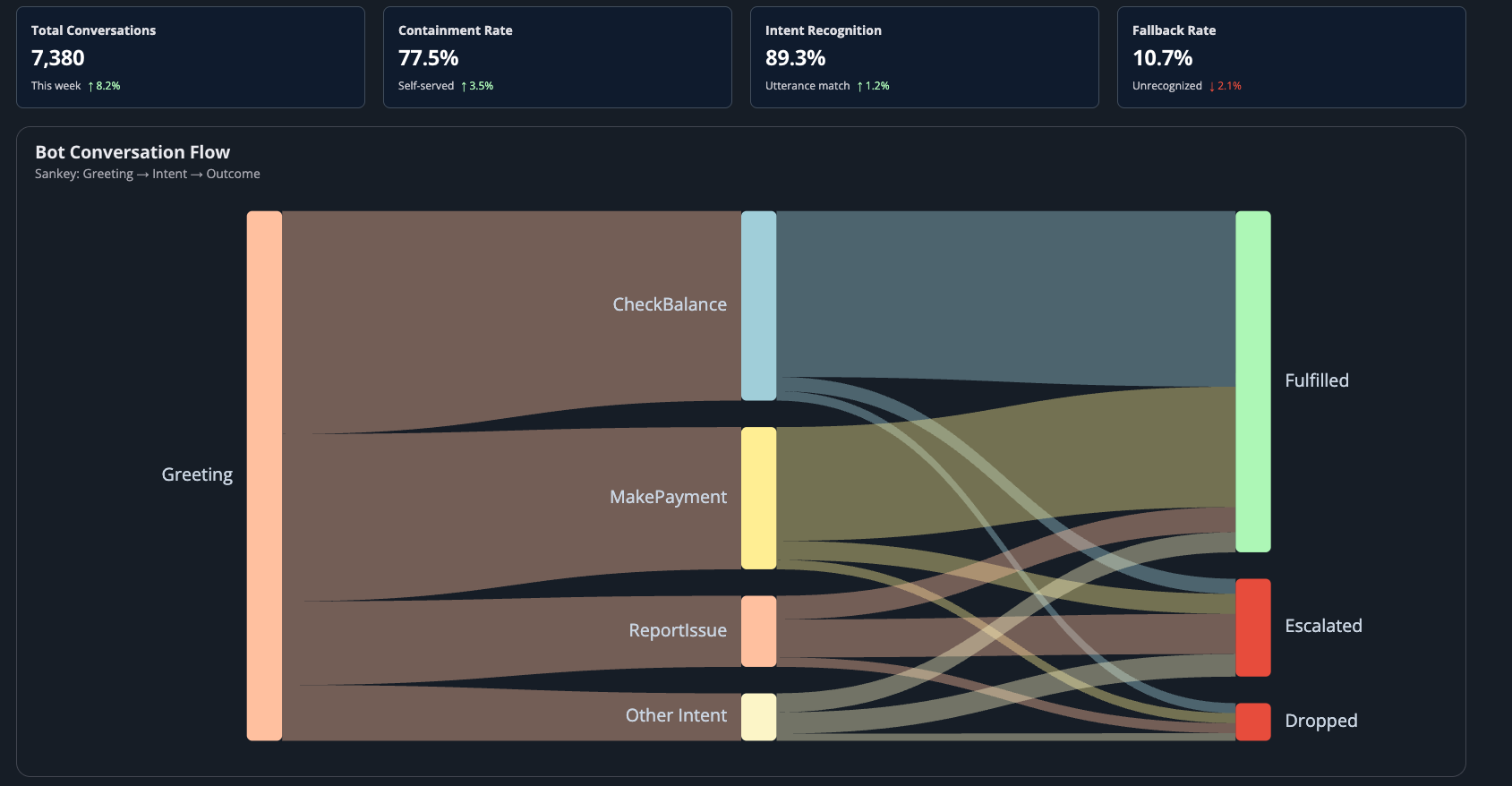
Conversation flow visualisation — see exactly where customers are being fulfilled, escalated, or dropped.
Your dashboards should show:
- Containment rate (trending over time)
- Intent recognition accuracy
- Fallback/escalation rate
- Conversation flow (where are people dropping off?)
- Latency metrics
Set up alerting for when metrics breach thresholds. If containment drops below 70%, you want to know immediately — not at the next sprint review.
The Takeaway
Go-live is not the end. It's the moment your bot meets reality for the first time. The question isn't whether you'll need to optimise — you will. The question is whether you've built the process to do it quickly, safely, and continuously.
Get this right and your bot improves every week. Get it wrong and you're stuck with a Day 1 bot that slowly erodes customer trust.
What Good Looks Like After 8 Weeks
When this process is running well, the numbers tell the story:
- Intent recognition moves from ~85% at launch to 93%+ — because you're catching misclassifications weekly and retraining
- Containment rate climbs from the high 60s to 80%+ — fewer customers hitting dead ends and escalating to agents
- Missed utterances per week drop from hundreds to single digits — the bot learns the language your customers actually use
- Slot fill rate improves from ~70% to 90%+ — because you've seen how people express dates, amounts, and account numbers in the wild
- Average bot latency stays under 1.5 seconds — because you caught that slow Lambda early and optimised it
- Time to deploy an improvement drops from days to hours — because the process is rehearsed and the pipeline is proven
None of these outcomes happen by accident. They happen because someone decided, before Day 1, that go-live was the beginning.
Prepare for the journey, not just the launch.